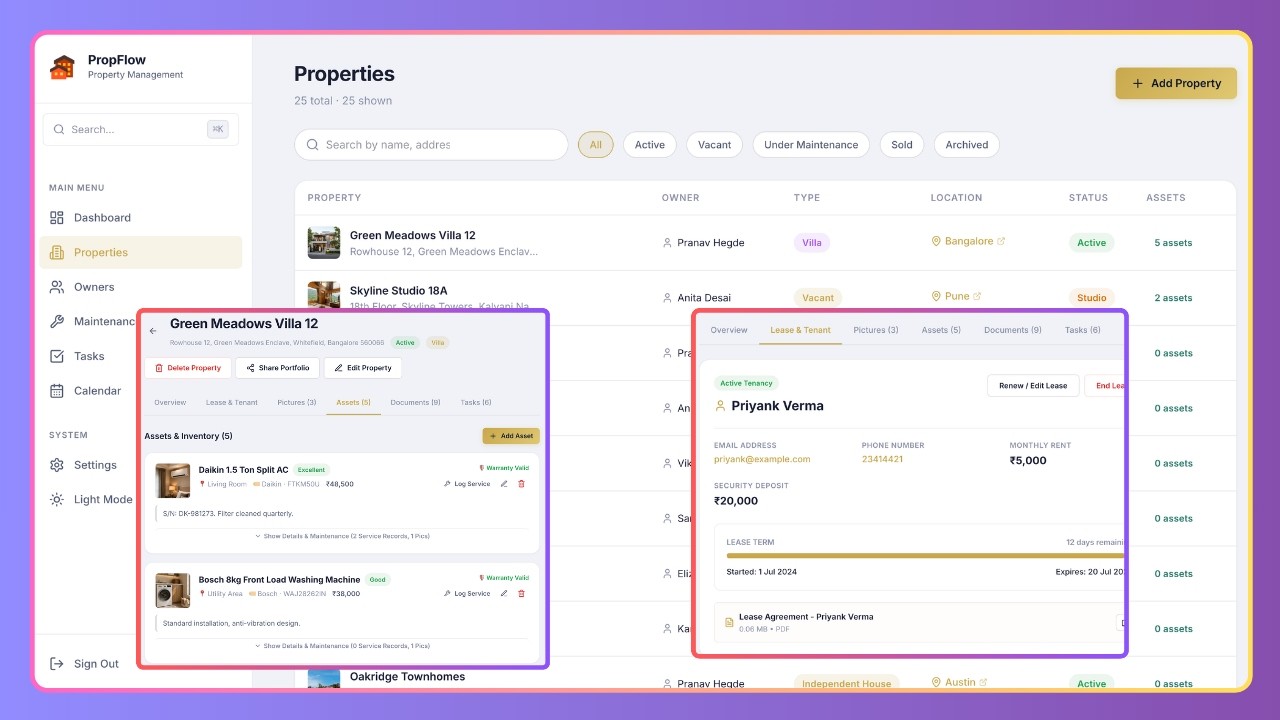
Overview
Manage rental properties, tenant leases, appliance inventories, documents, and tasks from a single command center with zero monthly fees. Meet PropFlow — a free, open-source Property & Asset Management System powered entirely by Google Sheets and Google Apps Script.
If you are a landlord, real estate investor, property manager, or broker, PropFlow keeps your operations organized, automated, and mobile-friendly without expensive software subscriptions (like Appfolio, Buildium, or TenantCloud). It bridges the gap between a private management hub and a client-facing marketing portal.
Key Features
✨ CORE FEATURES & FUNCTIONALITIES:
- 📊 Real-Time Operations Dashboard: Get quick counters for occupancy rates, expected monthly rental cash flow, active leases, and overdue tasks.
- ⚠️ Smart Risk Warning Panels: Automated alerts for leases expiring within 60 days, asset warranties expiring within 60 days, and high-priority overdue tasks.
- 🏠 Property & Unit Registry: A beautiful table with status buttons (Active, Vacant, Under Maintenance, Sold, Archived), bedrooms/bathrooms/area specifications, and an embedded Google Maps iframe.
- 📦 Asset & Appliance Inventory: Catalog furniture, ACs, water heaters, and refrigerators by brand, model, room, and condition. Upload photos of serial numbers or purchase receipts directly to the asset cards.
- 🔧 Maintenance Logs & Service Tracker: Schedule, record costs, and log contractors for routine servicing, plumbing, painting, or repairs.
- 📅 Google Calendar Integration: Leases, maintenance schedules, and tasks automatically sync with real-time push notification alerts on your phone.
- 📁 Automated Drive Document Cabinet: Upload sales deeds, tax bills, insurance papers, or signed lease PDFs directly to dedicated property folders on Google Drive.
- 📲 WhatsApp Sharing & Showcase Pages: Send pre-formatted property showcases with photo galleries, maps, and specifications to clients with a single click.
- 🌐 Portfolio Catalog Site: A public-facing property listing website to show active units to clients, ready to embed on Google Sites.
- 👤 Owner KYC Registry: Track properties owned by partners or clients, including passport, PAN card, Aadhaar number, or custom identity files.
What Happens After Purchase?
Once your payment is successfully processed, the delivery is fully automated:
- Instant Redirect & Success Screen: You will be immediately shown a success screen containing the direct link to copy the master Google Spreadsheet template.
- Email Confirmation: You will also receive an automated email confirmation at your registered email address containing your receipt and the spreadsheet copy link for lifetime access.
How to Use
🛠️ FIRST-TIME DEPLOYMENT CHECKLIST:
- Copy the Database: Open the Spreadsheet template copy link above and click File → Make a copy to save it to your Google Drive.
- Open Apps Script Backend: Go to Extensions → Apps Script from your copied spreadsheet to open the code editor.
- Deploy as Web App:
- Click Deploy → New deployment.
- Select Web app as the deployment type.
- Set Execute as to Me (your-email@gmail.com).
- Set Who has access to Anyone.
- Click Deploy.
- Authorize Permissions: Click Authorize access, select your Google account, click Advanced → Go to Web App (unsafe), and click Allow to authorize Sheets, Calendar, and Drive access.
- Run the Setup Wizard: Copy the generated Web App URL, open it in a new browser tab, and follow the 3-step boot wizard to connect the API and create your admin account.
- Sync Google Calendar: Go to Settings in the PropFlow app, create a new Google Calendar named "Property Management", copy its Calendar ID, and paste it into the sync field to activate real-time mobile reminders.
Contact & Support
Need custom features, design modifications, or dedicated setup support? Let's connect: 💬 WhatsApp: +919624701102
#PropertyManagement #RealEstateCRM #GoogleSheets #AppsScript #LandlordTools #PropertyTech #WorkflowAutomation