Overview
Commercial invoicing platforms like FreshBooks, QuickBooks, or Zoho Invoice drain $30 to $80 every single month while locking you into rigid layouts that refuse to match your exact business needs. Conversely, manual spreadsheets look amateurish, lack real-time payment tracking, and require tedious manual PDF exports and emailing.
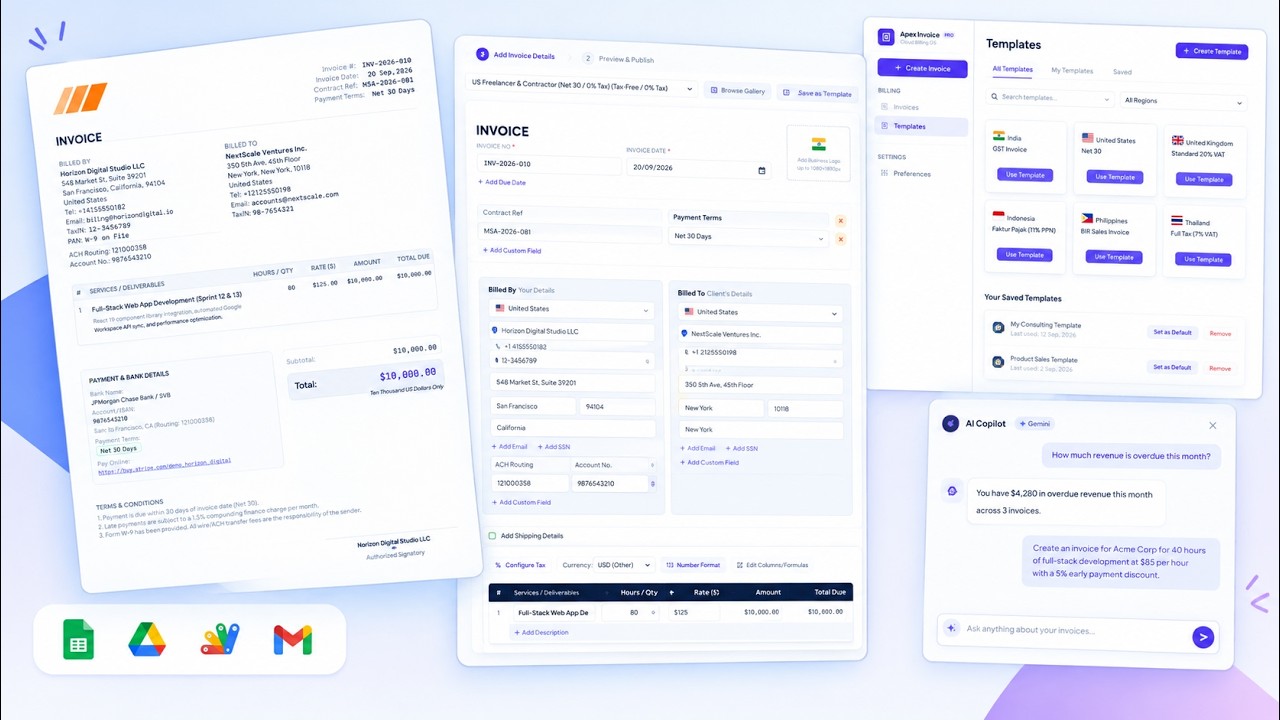
The AI-Powered Invoicing & Billing Web App (Apex Invoice) is a full-stack, 100% serverless billing operating system hosted entirely inside your private Google Workspace. Powered by Google Sheets, Google Apps Script, React 19, and Google Gemini AI, it gives you total control over every invoice element, dynamic table columns, one-click PDF archiving in Google Drive, automated Gmail dispatch, and a conversational AI Copilot that drafts invoices from plain English.
Key Features
✨ CORE CAPABILITIES & ARCHITECTURE:
- 🎨 Ultra-Customizable Live Invoice Canvas: Real-time visual editor where every single element can be edited on-canvas — header titles, invoice numbers, issue/due dates, custom references, and branding logos.
- 📊 Dynamic Table Column Engine: Show, hide, rename, and reorder line item columns (Item Description, HSN/SAC Code, Quantity, Rate, Unit, Discount %, Tax %, Total, plus arbitrary custom formula columns).
- 🌍 10 Pre-Loaded Regional Templates: Instant one-click templates covering US Freelancer Net 30, UK Standard 20% VAT, EU B2B Reverse Charge (Article 196), India GST (Intra/Inter-state), Indonesia Faktur Pajak (11% PPN), Philippines BIR (12% VAT / Non-VAT), and Thailand Full Tax Invoices.
- 🤖 Google Gemini 2.5 Flash AI Copilot: Slide-out assistant drawer with 6 native function-calling tools:
getFinancialOverview: Executive revenue, collections, and outstanding metrics.getOverdueInvoicesReport: Pinpoints past-due accounts and days overdue.queryInvoices: Filter and locate invoices by client name, status, or date range.getInvoiceDetails: Full itemized audit of any specific invoice.getClientBillingHistory: Client lifetime value and payment reliability.draftInvoice: Draft complete invoices conversationally from plain English.
- ✍️ Digital Signature Canvas & Business Logo Vault: Draw your authorized signature live on an HTML5 touch-enabled canvas or upload an image, safely stored in Google Drive.
- 📁 Automated Drive PDF & Gmail Dispatch: Clean, professional PDFs rendered directly from the canvas and archived automatically into your Google Drive, with one-click client delivery via Gmail.
- 🌐 100% Serverless & Zero Subscriptions: Single-file React 19 SPA running on Google Apps Script with zero recurring cloud hosting fees.
What Happens After Purchase?
Once your payment is successfully processed, digital delivery is fully automated:
- Instant Access & Copy Screen: You will immediately see a success confirmation containing the direct link to copy the master Google Spreadsheet template into your Google Drive.
- Email Receipt & Access Link: An automated email confirmation will also be sent to your inbox containing your order details and lifetime access link to the template.
How to Use
🛠️ FIRST-TIME SETUP & DEPLOYMENT GUIDE:
- Copy the Database: Open the Spreadsheet template copy link provided in your receipt and click Make a copy to save it to your Google Drive.
- Open Apps Script Editor: In your copied spreadsheet, navigate to Extensions → Apps Script.
- Deploy Web Application:
- Click the blue Deploy → New deployment button.
- Select type Web app.
- Set Execute as: Me (your Google account).
- Set Who has access: Anyone.
- Click Deploy.
- Authorize Permissions: Click Authorize access, choose your Google account, click Advanced → Go to Web App (unsafe), and click Allow for Sheets, Drive, and Gmail permissions.
- Start Invoicing: Open the generated Web App URL in your browser, upload your business logo, choose your currency and default template, and optionally paste your Gemini API key in Preferences to activate the AI Copilot!
Contact & Support
Need custom feature modifications, enterprise integrations, or dedicated setup support? 💬 WhatsApp Support: +919624701102